Wednesday, August 11, 2010

NWSGI 3.0 Plans

It looks like it's just about time for another major release of NWSGI - the last two Decembers have had major releases, and I see no need to break the trend this year. There are going to be a few major changes this time around, so if anyone has any objections, let me know as soon as possible.

Most importantly, it will only support IronPython 2.7 and thus will require .NET 4.0. Like the IronPython team, I'm not going out of my way to break compatibility with .NET 2.0 (or IronPython 2.6, for that matter), but I won't be distributing anything but IronPython 2.7/.NET 4.0 binaries.

Similarly, I will not be supporting IIS 6 (Windows Server 2003) anymore. Again, I won't go out of my way to break it, but I won't be testing against it either. This means I can get rid of the wildcard handling for good, since IIS 7 has a good URL rewriter available.

The biggest change is that I am decoupling the WSGI processing from the ASP.NET pipeline. All of the functionality is currently part of an IHttpHandler implementation, which restricts it to be used with IIS (and Cassini) only. NWSGI 3.0, on the other hand, will allow NWSGI to be used with HttpListener or other servers such as Kayak by moving all WSGI processing into a separate class with no ASP.NET dependencies. The redesign will also allow me to improve the test coverage from zero to, well, something.

Finally, the licence will change to the Apache Licence 2.0 to match IronPython. The basic terms are identical to the Ms-PL licence that was used previously; the Apache licence is just more explicit and also more widely used.

As with the previous versions, I expect to release the final version shortly after IronPython 2.7 is released.

Monday, August 9, 2010

The fate of IronPython?

It appears that Microsoft will not continue to fund IronRuby. Hopefully it will continue to flourish as a community project; I wish them luck. This does raise the question of whether IronPython will meet the same "fate"; in the absence of word from the IronPython team (it is the weekend, after all), I think I'll indulge in some wild speculation.

Mr. Schementi's last day at MS was July 23, meaning he probably gave his two weeks' notice an July 9. Thus, the writing was on the wall by the and of June/beginning of July. That's my rough timeline. But, something doesn't fit.

On July 1, Enthought announced that they would be porting NumPy and SciPy to IronPython and .NET. I would imagine that they would have gotten some assurance from Microsoft that the IronPython project would continue. Or, they've gotten shafted - it happens.

My hypothesis - that IronPython will continue to be funded, for now. The team has said that there are/were potential customers within Microsoft (the Dynamics team was one, I believe), which is critical for continued support. However, I believe there may be one other unexpected saviour - the Windows High-Performance Computing (HPC) team.

Python is the scripting language of choice in the HPC community, largely because of the NumPy/SciPy libraries mentioned earlier. I wouldn't be surprised if Microsoft was making a push to get Windows and .NET deeper into that space (it's small but profitable), and IronPython with NumPY/SciPy support could be a key part of that play.

Also, both teams had releases on July 16th – IronRuby 1.1 and IronPython 2.7 Alpha 1. I think that Alpha is an important signal of the team's expectations.

This is what happens when I have insomnia. Hopefully this will still make sense in the morning.

Sunday, June 27, 2010

Changes to builds for IronPython.SQLite and IronPython.Zlib

I've done some work on the builds for both IronPython.SQLite and IronPython.ZLib; with IronPython 2.7 on the way, the number of variants I need to build is going up. IronPython 2.7 will require .NET 4.0, so that saves me having to build a IronPython 2.7/.NET 2.0 version of everything as well.

Still, three variants is too many to build manually through Visual Studio, which is how I've built everything up to this point. The packaging into a zip file was also done manually. To save the effort, I've adopted psake as a build automation tool. It's based on PowerShell, which is a very nice administrative language (I actually prefer to Python for quick & dirty admin tasks – the horror!). The actually builds are still handled by MSBuild so that I can manage the files in Visual Studio; the psake script calls msbuild to build the library. I also have tasks to clean the source tree and build the .zip packages.

The MSBuild Files

The real trick in this is building an .csproj file that can handle being built for both .NET 2.0 and .NET 4.0. The key to it all is the TargetFrameworkVersion property; by default, it is hardcoded to a specific .NET version (v2.0, v3.5, or v4.0) in the .csproj file. To change it during the build, msbuild needs to know that we might provide it on the command line. If you've ever opened a .csproj file, you make recognize these lines:

<Configuration Condition=" '$(Configuration)' == '' ">Debug</Configuration>
<Platform Condition=" '$(Platform)' == '' ">AnyCPU</Platform>

These lines will set the Configuration and Platform properties if they are not already set from the command line; that's what that Condition attribute does. We just need to do the same thing for the TargetFrameworkVersion property:

<TargetFrameworkVersion Condition=" '$(TargetFrameworkVersion)' == '' ">v2.0</TargetFrameworkVersion>

This allows us to change the TargetFrameworkVersion from the command line. For a little future proofing, I add a property for the IronPython version as well:

<IronPythonVersion Condition=" '$(IronPythonVersion)' == '' ">2.6</IronPythonVersion>

The psake file

The psake build script is (by convention) default.ps1; I would have preferred build.ps1, but whatever. The core task is the Build task; all it does is call MSBuild:

task Build -Depends GenVersion {
    exec { 
        msbuild /nologo /verbosity:minimal "$ProjectPath" `
            /t:Build `
            /p:Configuration=$Configuration `
            /p:TargetFrameworkVersion=$TargetFrameworkVersion `
            /p:OutputPath="..\$OutputPath" `
            /p:IronPythonVersion=$IronPythonVersion
    }
}

There are also tasks to build the zip files (requires 7-zip on the build system) and run the tests for the given project. All in all, using psake has been a great move, and while I have a few minor issues with it, I highly recommend it.

Building the Damn Thing

This is all well and good, but how do you actually use it to build it the library? Switch to the build directory, and, in a PwoerShell window, run:

.\psake

That's it, if a default .NET 2.0 Debug build is what you want; it will also run the tests. To build a Release build for .NET 4:

.\psake build –framework 4.0 –parameters @{config='Release'}

Finally, you can build the zip packages:

.\psake package

It's all much simpler than firing up Visual Studio and building zip files by hand.

Visual Studio 2010 Upgrade

I've also upgraded the IronPython.SQLite and IronPython.Zlib solution files to Visual Studio 2010. You can use the free Express editions to build them. Also, none of these changes affect NWSGI, yet.

Saturday, May 1, 2010

IronPython: SQLite and Zlib

Wow, it’s been a long time – I wanted to manage at least one post per month, but it’s been three months. Ah well, I’ve been busy working on filling in a couple of holes in the IronPython standard library: sqlite3 and zlib.

IronPython.Zlib

IronPython.Zlib implements the zlib module for IronPython using ComponentAce’s zlib.net, which is a purely managed implementation of the zlib library. IronPython.Zlib is entirely managed code and works with both 32-bit and 64-bit IronPython. It passes all of the Python 2.6 zlib and gzip tests and most of the zipfile tests.

IronPython.SQLite

IronPython.SQLite is a port of pysqlite to IronPython using C#-SQLite, which, similar to zlib.net, is a managed implementation of SQLite. Thus, IronPython.SQLite is also 100% managed code. It passes about 87% of the Python 2.6 sqlite3 tests; the remaining ones are mostly corner cases or rarely used functionality.

.NET 4 Support

Neither of the above libraries have been built or tested with IronPython for .NET 4.0. I don’t see any reason they shouldn’t work, but they’ve never been tried. If anyone does try, let me know how it goes!

Sunday, January 31, 2010

Debugging Techniques for IronPython: Breakpoints

Currently, programs IronPython is not particularly easy to debug – they Python code gets mixed in with the code for IronPython itself and can be hard to follow. This is the first of a few tricks to make debugging easier.

Trigger a Breakpoint

This is my favourite and most used technique – I sometimes wish Python had the equivalent of JavaScript's debugger keyword to make it easier to use. The trick is to use the System.Diagnostics.Debugger.Break() function to insert a breakpoint in your code – when the breakpoint is hit, Windows will offer to launch a debugger for you. Also make sure that you launch IronPython with the –X:Debug switch, or it will be next to impossible to debug.

Insert the following line where you want to trigger the breakpoint:

import System.Diagnostics; System.Diagnostics.Debugger.Break()

Windows will then open the following dialog (if you have Visual Studio installed; I don't have a machine without VS to see what it looks like otherwise):

vsjitbdgr

I prefer to use VS for debugging, so I'll open a  new instance of Visual Studio 2008.

Browsing the Call Stack

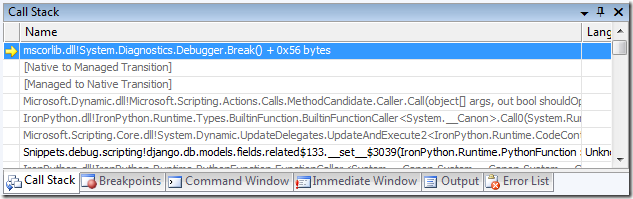
Now, we'll need to go looking for the actual Python code in the call stack. Open the call stack browser, and you'll see something like this:

dbgrbrk

There are a few things to note here, especially if you're not familiar with the VS debugger:

  • Each line represents a call stack frame (a function call, basically).
  • The yellow arrow is the current execution location; this is our breakpoint.
  • Faded-out lines are frames that do not have any debug information available. They can be ignored.
  • Lines beginning with "Snippets.debug" are the actual Python stack frames we are looking for. Double click on those lines to open up the source for those files in the Visual Studio editor.

Once the Python source is loaded in the editor, you can inspect variable values by hovering over them with the mouse, just like in any other Visual Studio language. To find the calling stack frame, you'll have to skip over several IronPython frames to find the next Python frame.

A better experience would elide the IronPython frames; perhaps Harry Pierson's debugger work could be applied to improve it. That, and other Visual Studio improvements for IronPython, are another project entirely.